External rate

External rate

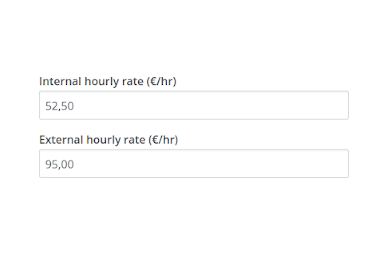
Calculate your profit by adding an external hourly rate.

When you add a user to a project, you can set an hourly rate. This rate is used for calculating the budget usage. For billable projects the rate is the basis for calculating the turnover.

You can now add a second rate to each user. With this second hourly tariff, you can have an internal rate to calculate cost, and an external rate to calculate turnover.

You can also set a different currency for the second rate, and have the turnover calculated in two currencies automatically.


Related Posts

eHour is now available as a ChatGPT plugin

Track time, run timers, check timesheet submissions and view saved reports directly in ChatGPT.

Read more

More ways to track time in eHour

Record separate pieces of work, review your day, fill in the familiar weekly grid, track time on your phone, or ask an AI assistant.

Read more

Reporting, redesigned from filter to export

Explore time data with richer filters, drill-down reporting, new utilization and profitability columns, shareable reports, and better exports.

Read more