Timesheet Approval Status

Timesheet Approval Status

Intuitive color-coded timesheet statuses.

Timesheet Approval Status

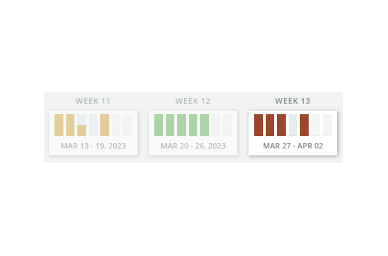
We have improved the visibility of the timesheet status by adding color coding to the week slider above the timesheet. You can now quickly identify the approval status of each day based on the day’s color.

Green indicates that the timesheet has been approved, yellow indicates that it is pending approval, red marks that it is rejected, and the default color means that approval still needs to be requested.


Related Posts

eHour now speaks MCP

Track time, run timers, and manage projects in eHour straight from Claude Code, Codex, Cursor, or any MCP-compatible client.

Read more

Track time without leaving Jira

Our native Jira app is now generally available on the Atlassian Marketplace. Start a timer, log hours, and see the history right inside the issue.

Read more

eHour versus Toggl Track

Compare eHour and Toggl. Understand the difference between a flexible timer tool and structured team time tracking.

Read more